# 정발행/역발행/위수탁
전자세금계산서는 발행 유형에 따라 정발행, 역발행, 위수탁으로 구분됩니다. 전자세금계산서 작성자와 발행자에 따라 적절한 발행 유형만 선택하여 연동할 수 있습니다.
## 1. 정발행
정발행은 공급자가 전자세금계산서를 작성한 뒤 공동인증서로 전자서명하여 발행하고, 공급받는자에게 메일로 교부하는 유형입니다.\
동시에 1만건 이상 전자세금계산서를 발행하는 경우에는, [\[대량발행\]](https://developers.popbill.com/guide/taxinvoice/introduction/bulk-issue) 프로세스로 구현을 권장합니다.
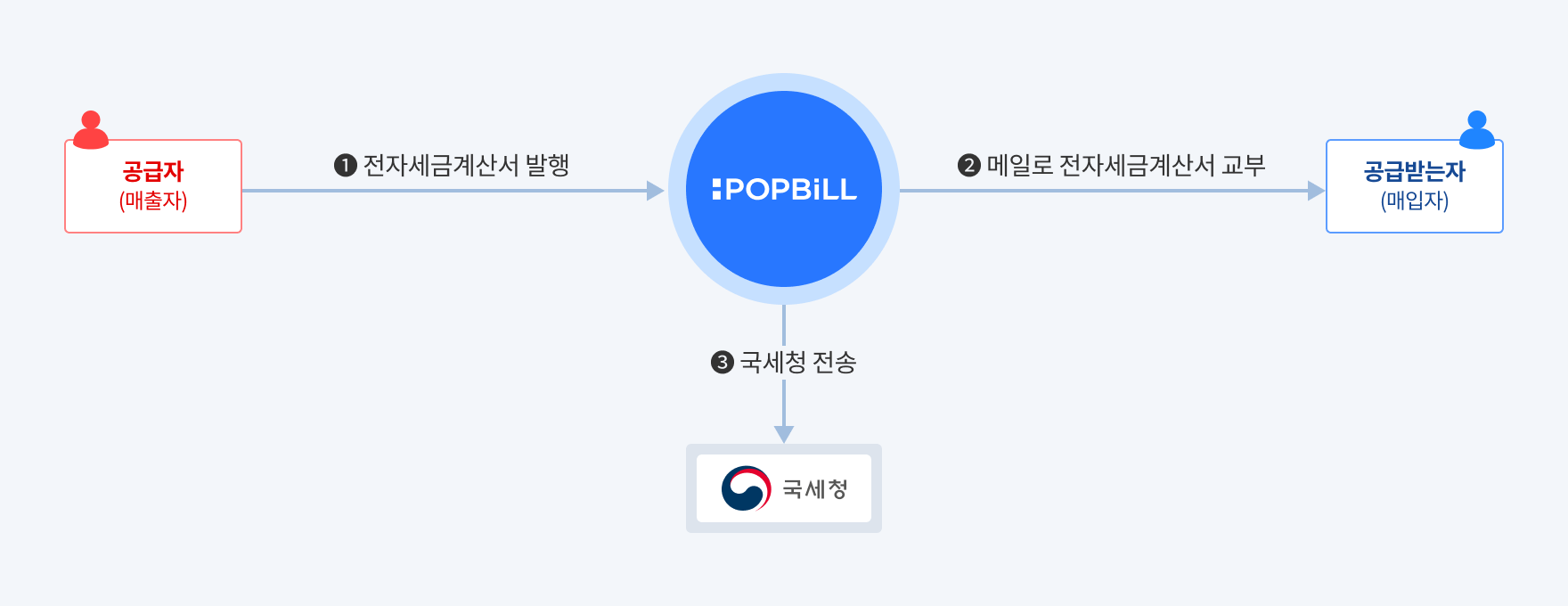
| 전자세금계산서 작성 | 전자서명(발행) | 팝빌 회원가입 | 안내메일 수신 |
| ---------- | -------- | ------- | ------- |
| 공급자 | 공급자 | 공급자 | 공급받는자 |
> 공급자는 사업자번호 기반으로 발급된 공동인증서를 팝빌에 사전 등록해야만 전자세금계산서 발행이 가능합니다. [\[공동인증서\]](https://developers.popbill.com/guide/taxinvoice/introduction/certificate)
### 발행 프로세스
전자세금계산서 발행은 ‘임시저장’과 ‘발행’ 단계로 구분됩니다. 프로그램 공급사는 각 단계의 처리방식에 따라 구별되는 2가지 프로세스 중, 업무에 적합한 프로세스를 선택하여 구현할 수 있습니다.
- **즉시 발행(권장)**\
임시저장과 발행을 **한 번에** 처리하는 방식으로, 프로그램 공급사의 트랜잭션 처리 편의성을 고려한 프로세스입니다. [\[RegistIssue - 즉시 발행\]](https://developers.popbill.com/api-reference/taxinvoice/api/issue#RegistIssue)
- **임시저장 후 발행**\
임시저장과 발행을 각각 별도의 트랜잭션으로 **순차적**으로 처리하는 방식입니다. [\[Register - 임시저장\]](https://developers.popbill.com/api-reference/taxinvoice/api/issue#Register) → [\[Issue-발행\]](https://developers.popbill.com/api-reference/taxinvoice/api/issue#Issue)\
※ 파일첨부 기능을 이용하는 경우에는 “임시저장 후 발행” 방식에서만 사용 가능합니다.
**즉시 발행**
```mermaid
flowchart LR
WriteInvoicer("공급자 작성")
Issued("발행완료
(300)")
Canceled("발행취소
(600)")
SendNTS{"국세청 전송"}
SendFail("전송실패
(305)")
SendSuccess("전송성공
(304)")
WriteInvoicer -- RegistIssue
(즉시 발행) --> Issued
Issued --> SendNTS
SendNTS --> SendFail
SendNTS --> SendSuccess
Issued -- CancelIssue
(발행취소) --> Canceled
classDef invoicer stroke-width:1px,font-weight:bold;
classDef popbill stroke-width:1px,font-weight:bold;
class WriteInvoicer,Issued,Canceled invoicer
class SendNTS,SendSuccess,SendFail popbill
```
**임시저장 후 발행**
```mermaid
flowchart LR
WriteInvoicer("공급자 작성")
Draft("임시저장
(100)")
Issued("발행완료
(300)")
Canceled("발행취소
(600)")
SendNTS{"국세청 전송"}
SendFail("전송실패
(305)")
SendSuccess("전송성공
(304)")
WriteInvoicer -- Register
(임시저장) --> Draft
Draft -- Issue
(발행) --> Issued
Issued --> SendNTS
SendNTS --> SendFail
SendNTS --> SendSuccess
Issued -- CancelIssue
(발행취소) --> Canceled
classDef invoicer stroke-width:1px,font-weight:bold;
classDef popbill stroke-width:1px,font-weight:bold;
class WriteInvoicer,Draft,Issued,Canceled invoicer
class SendNTS,SendSuccess,SendFail popbill
```
### 문서번호 관리체계
문서번호란 전자세금계산서의 중복 발행을 방지하고 내부 관리를 위해 프로그램 공급사가 직접 생성하고 할당하는 고유번호 입니다.
| 관리주체 | 유형 | 변수명 | 길이 | 설명 |
| -------- | -------- | -------------- | :-: | --------------------------------------------------------------- |
| 프로그램 공급사 | 공급자 문서번호 | invoicerMgtKey | 24 | 문서 관리를 위해 파트너가 할당하는 고유 식별번호 영문 대소문자, 숫자, 특수문자(’-’, ’\_‘)만 입력 가능 |
| 팝빌 | 국세청승인번호 | ntsConfirmNum | 24 | 전자세금계산서 발행 시점에 팝빌에서 자동으로 할당 |
> “국세청승인번호”는 국세청 신고를 위해 팝빌이 생성하고 할당한 전자세금계산서의 식별값(Unique Value) 입니다.
### 상태확인
팝빌에서 처리된 전자세금계산서 상태를 확인하는 방법은 2가지를 지원합니다.
- **Webhook(Push)**\
팝빌에서 전자세금계산서 상태가 변경된 시점에 파트너가 지정한 Callback URL로 이벤트 전송 [\[Webhook\]](https://developers.popbill.com/api-reference/taxinvoice/webhook/introduction)
- **API(Polling)**\
파트너가 주기적으로 API를 호출하여 상태 확인
**Webhook(Push)**
```mermaid
sequenceDiagram
participant 공급자
participant Webhook Receiver
participant POPBiLL
공급자->>POPBiLL: Callback URL 등록
공급자->>POPBiLL: RegistIssue - 즉시 발행
POPBiLL-->>공급자: ntsConfirmNum(국세청승인번호) 반환
POPBiLL->>Webhook Receiver: Webhook 실행
Event Type = "Issue"
POPBiLL->>POPBiLL: 공급받는자
휴폐업 조회
POPBiLL->>Webhook Receiver: Webhook 실행
Event Type = "CLOSEDOWN"
Webhook Receiver->>Webhook Receiver: 결과 업데이트
POPBiLL->>POPBiLL: 국세청 전송
POPBiLL->>Webhook Receiver: Webhook 실행
Event Type = "NTS"
stateCode = 301(전송 전)
Webhook Receiver->>Webhook Receiver: 결과 업데이트
POPBiLL->>POPBiLL: 국세청 전송 처리 완료
POPBiLL->>Webhook Receiver: Webhook 실행
Event Type = "NTS"
stateCode = 304(전송성공)
stateCode = 305(전송실패)
Webhook Receiver->>Webhook Receiver: 결과 업데이트
```
**API(Polling)**
```mermaid
sequenceDiagram
participant 공급자
participant POPBiLL
공급자->>POPBiLL: RegistIssue - 즉시 발행
POPBiLL-->>공급자: ntsConfirmNum(국세청승인번호) 반환
POPBiLL->>POPBiLL: 공급받는자
휴폐업 조회
POPBiLL->>POPBiLL: 국세청 전송 및 결과반영
공급자->>POPBiLL: GetInfo - 상태 확인
POPBiLL-->>공급자: stateCode(상태코드) 반환
stateCode = 304(전송성공)
stateCode = 305(전송실패)
공급자->>공급자: 결과 업데이트
```
## 2. 역발행
역발행은 공급받는자가 전자세금계산서를 작성해 공급자에게 요청하고, 공급자가 공동인증서로 전자서명하여 발행하는 유형입니다.
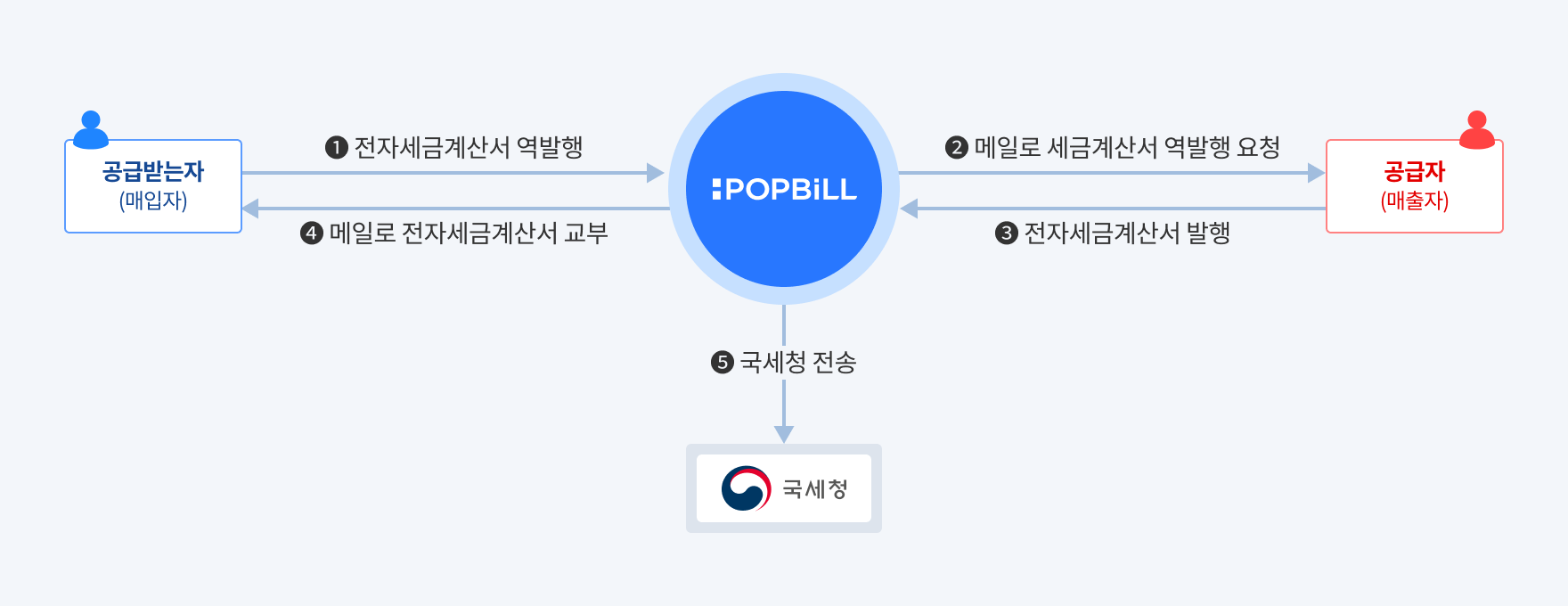
| 전자세금계산서 작성 | 전자서명(발행) | 팝빌 회원가입 | 안내메일 수신 |
| ---------- | -------- | ------------- | ------------------------ |
| 공급받는자 | 공급자 | 공급자, 공급받는자 모두 | 역발행요청 – 공급자 발행안내 – 공급받는자 |
> 공급자는 사업자번호 기반으로 발급된 공동인증서를 팝빌에 사전 등록해야만 전자세금계산서 발행이 가능합니다. [\[공동인증서\]](https://developers.popbill.com/guide/taxinvoice/introduction/certificate)
> **역발행 전자세금계산서 과금**
>
> - 역발행 요청된 전자세금계산서를 공급자가 발행(전자서명)하는 시점에 포인트가 차감됩니다.
> - 과금방식은 `Taxinvoice` 객체의 `chargeDirection` 변수값 설정에 따라 공급자 포인트에서 과금(Default) 하거나, 공급받는자 포인트에서 역과금 가능합니다.
### 역발행 프로세스
역발행 전자세금계산서 요청은 ‘임시저장’과 ‘역발행 요청’ 단계로 구분됩니다. 프로그램 공급사는 각 단계의 처리방식에 따라 구별되는 2가지 프로세스 중 업무에 적합한 프로세스를 선택하여 구현합니다.
- **즉시 요청(권장)**\
프로그램 공급사의 트랜잭션 편의성을 고려하여 임시저장과 역발행 요청을 **동시에** 처리 [\[RegistRequest - 즉시 요청\]](https://developers.popbill.com/api-reference/taxinvoice/api/issue#RegistRequest)
- **임시저장 후 요청** 임시저장과 역발행 요청 트랜잭션을 **순차적**으로 처리 [\[Register - 임시저장\]](https://developers.popbill.com/api-reference/taxinvoice/api/issue#Register) → [\[Request - 역발행 요청\]](https://developers.popbill.com/api-reference/taxinvoice/api/issue#Request)\
※ 파일첨부 기능은 “임시저장 후 요청” 유형으로만 가능
**즉시 요청**
```mermaid
flowchart LR
WriteInvoicee("공급받는자 작성")
Requested("(역)발행대기
(200)")
RequestCanceled("(역)발행취소
(500)")
IssueOrReject{"발행/거부"}
Refused("(역)발행거부
(400)")
Issued("발행완료
(300)")
Canceled("발행취소
(600)")
SendNTS{"국세청 전송"}
SendFail("전송실패
(305)")
SendSuccess("전송성공
(304)")
WriteInvoicee -- RegistRequest
(역발행 즉시 요청) --> Requested
Requested -- CancelRequest
(역발행 요청취소) --> RequestCanceled
Requested --> IssueOrReject
IssueOrReject -- Issue
(발행) --> Issued
IssueOrReject -- Refuse
(역발행 요청거부) --> Refused
Issued -- CancelIssue
(발행취소) --> Canceled
Issued --> SendNTS
SendNTS --> SendFail
SendNTS --> SendSuccess
classDef invoicee stroke-width:1px,font-weight:bold;
classDef invoicer stroke-width:1px,font-weight:bold;
classDef popbill stroke-width:1px,font-weight:bold;
class WriteInvoicee,Requested,RequestCanceled invoicee
class IssueOrReject,Refused,Issued,Canceled invoicer
class SendNTS,SendSuccess,SendFail popbill
```
**임시저장 후 요청**
```mermaid
flowchart LR
WriteInvoicee("공급받는자 작성")
Draft("임시저장
(100)")
Requested("(역)발행대기
(200)")
RequestCanceled("(역)발행취소
(500)")
IssueOrReject{"발행/거부"}
Refused("(역)발행거부
(400)")
Issued("발행완료
(300)")
Canceled("발행취소
(600)")
SendNTS{"국세청 전송"}
SendFail("전송실패
(305)")
SendSuccess("전송성공
(304)")
WriteInvoicee -- Register
(임시저장) --> Draft
Draft -- Request
(역발행 요청) --> Requested
Requested --> IssueOrReject
Requested -- CancelRequest
(역발행 요청취소) --> RequestCanceled
IssueOrReject -- Issue
(발행) --> Issued
IssueOrReject -- Refuse
(역발행 요청거부) --> Refused
Issued -- CancelIssue
(발행취소) --> Canceled
Issued --> SendNTS
SendNTS --> SendFail
SendNTS --> SendSuccess
classDef invoicee stroke-width:1px,font-weight:bold;
classDef invoicer stroke-width:1px,font-weight:bold;
classDef popbill stroke-width:1px,font-weight:bold;
class WriteInvoicee,Requested,RequestCanceled,Draft invoicee
class IssueOrReject,Refused,Issued,Canceled invoicer
class SendNTS,SendSuccess,SendFail popbill
```
### 문서번호 관리체계
문서번호란 전자세금계산서의 중복발행을 방지하고 내부 관리 목적으로 프로그램 공급사가 직접 생성하여 할당하는 고유번호 입니다.
| 관리주체 | 유형 | 변수명 | 길이 | 설명 |
| -------- | ---------- | -------------- | -- | --------------------------------------------------------------- |
| 프로그램 공급사 | 공급받는자 문서번호 | invoiceeMgtKey | 24 | 문서 관리를 위해 파트너가 할당하는 고유 식별번호 영문 대소문자, 숫자, 특수문자(’-’, ’\_‘)만 입력 가능 |
| 팝빌 | 국세청승인번호 | ntsConfirmNum | 24 | 전자세금계산서 발행 시점에 팝빌에서 자동으로 할당 |
> “국세청승인번호”는 국세청 신고를 위해 팝빌이 생성하고 할당한 전자세금계산서의 식별값(Unique Value) 입니다.
### 상태확인
팝빌에서 처리된 전자세금계산서 상태 확인을 위해 2가지 방법을 지원합니다.
- **Webhook(Push)**\
팝빌에서 전자세금계산서 상태가 변경된 시점에 파트너가 지정한 Callback URL로 이벤트 전송 [\[Webhook\]](https://developers.popbill.com/api-reference/taxinvoice/webhook/introduction)
- **API(Polling)**\
파트너가 주기적으로 API를 호출하여 상태 확인
**Webhook(Push)**
```mermaid
sequenceDiagram
participant 공급받는자
participant 공급자
participant Webhook Receiver
participant POPBiLL
공급받는자->>POPBiLL: Callback URL 등록
공급받는자->>POPBiLL: RegistRequest - 역발행 즉시 요청
POPBiLL->>공급자: 역발행 요청
POPBiLL-->>공급받는자: Response(처리결과) 반환
POPBiLL->>Webhook Receiver: Webhook 실행
Event Type = "Request"
공급자->>POPBiLL: 전자세금계산서 발행
POPBiLL->>Webhook Receiver: Webhook 실행
Event Type = "Issue"
Webhook Receiver->>Webhook Receiver: 결과 업데이트
POPBiLL->>Webhook Receiver: Webhook 실행
Event Type = "CLOSEDOWN"
Webhook Receiver->>Webhook Receiver: 결과 업데이트
POPBiLL->>POPBiLL: 국세청 전송
POPBiLL->>Webhook Receiver: Webhook 실행
Event Type = "NTS"
stateCode = 301(전송 전)
Webhook Receiver->>Webhook Receiver: 결과 업데이트
POPBiLL->>POPBiLL: 국세청 전송 처리 완료
POPBiLL->>Webhook Receiver: Webhook 실행
Event Type = "NTS"
stateCode = 304(전송성공)
stateCode = 305(전송실패)
Webhook Receiver->>Webhook Receiver: 결과 업데이트
```
**API(Polling)**
```mermaid
sequenceDiagram
participant 공급받는자
participant 공급자
participant POPBiLL
공급받는자->>POPBiLL: RegistRequest - 역발행 요청
POPBiLL->>공급자: 역발행 요청
POPBiLL-->>공급받는자: Response(처리결과) 반환
공급자->>POPBiLL: 전자세금계산서 발행
POPBiLL->>POPBiLL: 공급받는자
휴폐업 조회
POPBiLL->>POPBiLL: 국세청 전송 및 결과반영
공급받는자->>POPBiLL: GetInfo - 상태 확인
POPBiLL-->>공급받는자: stateCode(상태코드) 반환
stateCode = 304(전송성공)
stateCode = 305(전송실패)
공급받는자->>공급받는자: 결과 업데이트
```
## 3. 위수탁
위수탁은 수탁자가 공급자를 대신해 전자세금계산서를 작성·전자서명해 발행하고, 공급받는자에게 메일로 교부하는 유형입니다.
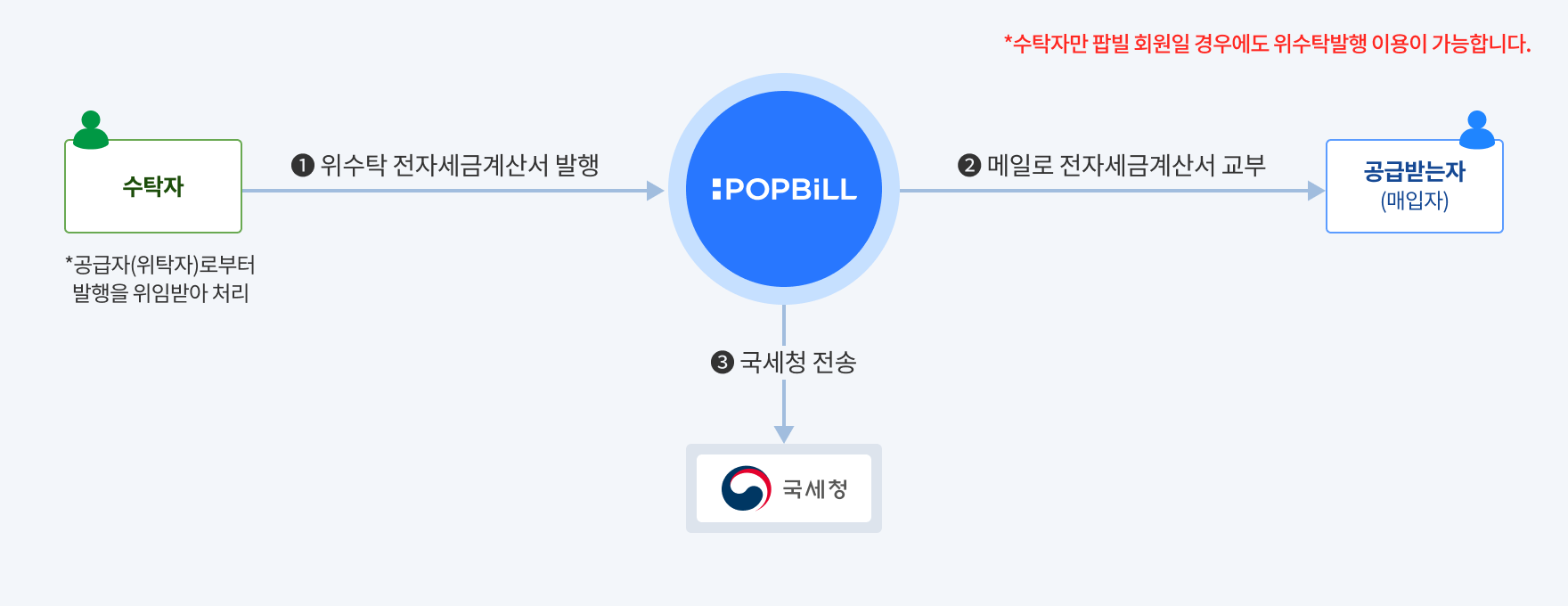
| 전자세금계산서 작성 | 전자서명(발행) | 팝빌 회원가입 | 안내메일 수신 |
| ---------- | -------- | ------- | --------------- |
| 수탁자 | 수탁자 | 수탁자 | 공급자(위탁자), 공급받는자 |
> 수탁자는 사업자번호 기반으로 발급된 공동인증서를 팝빌에 사전 등록해야만 전자세금계산서 발행이 가능합니다. [\[공동인증서\]](https://developers.popbill.com/guide/taxinvoice/introduction/certificate)
### 위수탁 프로세스
위수탁 전자세금계산서 발행은 ‘임시저장’과 ‘발행’ 단계로 구분됩니다. 프로그램 공급사는 각 단계의 처리방식에 따라 구별되는 2가지 프로세스 중 업무에 적합한 프로세스를 선택하여 구현합니다.
- **즉시 발행(권장)**\
프로그램 공급사의 트랜잭션 편의성을 고려하여 임시저장과 발행을 **동시에** 처리 [\[RegistIssue - 즉시 발행\]](https://developers.popbill.com/api-reference/taxinvoice/api/issue#RegistIssue)
- **임시저장 후 발행**\
임시저장과 발행 트랜잭션을 **순차적**으로 처리 [\[Register - 임시저장\]](https://developers.popbill.com/api-reference/taxinvoice/api/issue#Register) → [\[Issue - 발행\]](https://developers.popbill.com/api-reference/taxinvoice/api/issue#Issue)\
※ 파일첨부 기능은 “임시저장 후 발행” 유형으로만 가능
**즉시 발행**
```mermaid
flowchart LR
WriteTrustee("수탁자 작성")
Issued("발행완료
(300)")
Canceled("발행취소
(600)")
SendNTS{"국세청 전송"}
SendFail("전송실패
(305)")
SendSuccess("전송성공
(304)")
WriteTrustee("수탁자 작성") -- RegistIssue
(즉시발행) --> Issued
Issued --> SendNTS
SendNTS --> SendFail
SendNTS --> SendSuccess
Issued -- CancelIssue
(발행취소) --> Canceled
classDef trustee stroke-width:1px,font-weight:bold;
classDef popbill stroke-width:1px,font-weight:bold;
class WriteTrustee,Issued,Canceled trustee
class SendNTS,SendSuccess,SendFail popbill
```
**임시저장 후 발행**
```mermaid
flowchart LR
WriteTrustee("수탁자 작성")
Draft("임시저장
(100)")
Issued("발행완료
(300)")
Canceled("발행취소
(600)")
SendNTS{"국세청 전송"}
SendFail("전송실패
(305)")
SendSuccess("전송성공
(304)")
WriteTrustee("수탁자 작성") -- Register
(임시저장) --> Draft
Draft -- Issue
(발행) --> Issued
Issued --> SendNTS
SendNTS --> SendFail
SendNTS --> SendSuccess
Issued -- CancelIssue
(발행취소) --> Canceled
classDef trustee stroke-width:1px,font-weight:bold;
classDef popbill stroke-width:1px,font-weight:bold;
class WriteTrustee,Draft,Issued,Canceled trustee
class SendNTS,SendSuccess,SendFail popbill
```
### 문서번호 관리체계
문서번호란 전자세금계산서의 중복발행을 방지하고 내부 관리 목적으로 프로그램 공급사가 직접 생성하여 할당하는 고유번호 입니다.
| 관리주체 | 유형 | 변수명 | 길이 | 설명 |
| -------- | -------- | ------------- | -- | --------------------------------------------------------------- |
| 프로그램 공급사 | 수탁자 문서번호 | trusteeMgtKey | 24 | 문서 관리를 위해 파트너가 할당하는 고유 식별번호 영문 대소문자, 숫자, 특수문자(’-’, ’\_‘)만 입력 가능 |
| 팝빌 | 국세청승인번호 | ntsConfirmNum | 24 | 전자세금계산서 발행 시점에 팝빌에서 자동으로 할당 |
> “국세청승인번호”는 국세청 신고를 위해 팝빌이 생성하고 할당한 전자세금계산서의 식별값(Unique Value) 입니다.
### 상태확인
팝빌에서 처리된 전자세금계산서 상태 확인을 위해 아래 2가지 방법을 지원합니다.
- **Webhook(Push)**\
팝빌에서 전자세금계산서 상태가 변경된 시점에 파트너가 지정한 Callback URL로 이벤트 전송 [\[Webhook\]](https://developers.popbill.com/api-reference/taxinvoice/webhook/introduction)
- **API(Polling)**\
파트너가 주기적으로 API를 호출하여 상태 확인
**Webhook(Push)**
```mermaid
sequenceDiagram
participant 수탁자
participant Webhook Receiver
participant POPBiLL
수탁자->>POPBiLL: Callback URL 등록
수탁자->>POPBiLL: RegistIssue - 즉시 발행
POPBiLL-->>수탁자: ntsConfirmNum(국세청승인번호) 반환
POPBiLL->>Webhook Receiver: Webhook 실행
Event Type = "Issue"
POPBiLL->>POPBiLL: 공급받는자
휴폐업 조회
POPBiLL->>Webhook Receiver: Webhook 실행
Event Type = "CLOSEDOWN"
Webhook Receiver->>Webhook Receiver: 결과 업데이트
POPBiLL->>POPBiLL: 국세청 전송
POPBiLL->>Webhook Receiver: Webhook 실행
Event Type = "NTS"
stateCode = 301(전송 전)
Webhook Receiver->>Webhook Receiver: 결과 업데이트
POPBiLL->>POPBiLL: 국세청 전송 처리 완료
POPBiLL->>Webhook Receiver: Webhook 실행
Event Type = "NTS"
stateCode = 304(전송성공)
stateCode = 305(전송실패)
Webhook Receiver->>Webhook Receiver: 결과 업데이트
```
**API(Polling)**
```mermaid
sequenceDiagram
participant 수탁자
participant POPBiLL
수탁자->>POPBiLL: RegistIssue - 즉시 발행
POPBiLL-->>수탁자: ntsConfirmNum(국세청승인번호) 반환
POPBiLL->>POPBiLL: 공급받는자
휴폐업 조회
POPBiLL->>POPBiLL: 국세청 전송 및 결과반영
수탁자->>POPBiLL: GetInfo - 상태 확인
POPBiLL-->>수탁자: stateCode(상태코드) 반환
stateCode = 304(전송성공)
stateCode = 305(전송실패)
수탁자->>수탁자: 결과 업데이트
```