Webhook Overview
A Webhook is a function in POPBiLL that automatically sends event information to the customer’s server as soon as a specific event occurs. By receiving POPBiLL event information in real time without calling the API, customers can operate their systems more efficiently.
Webhook Process
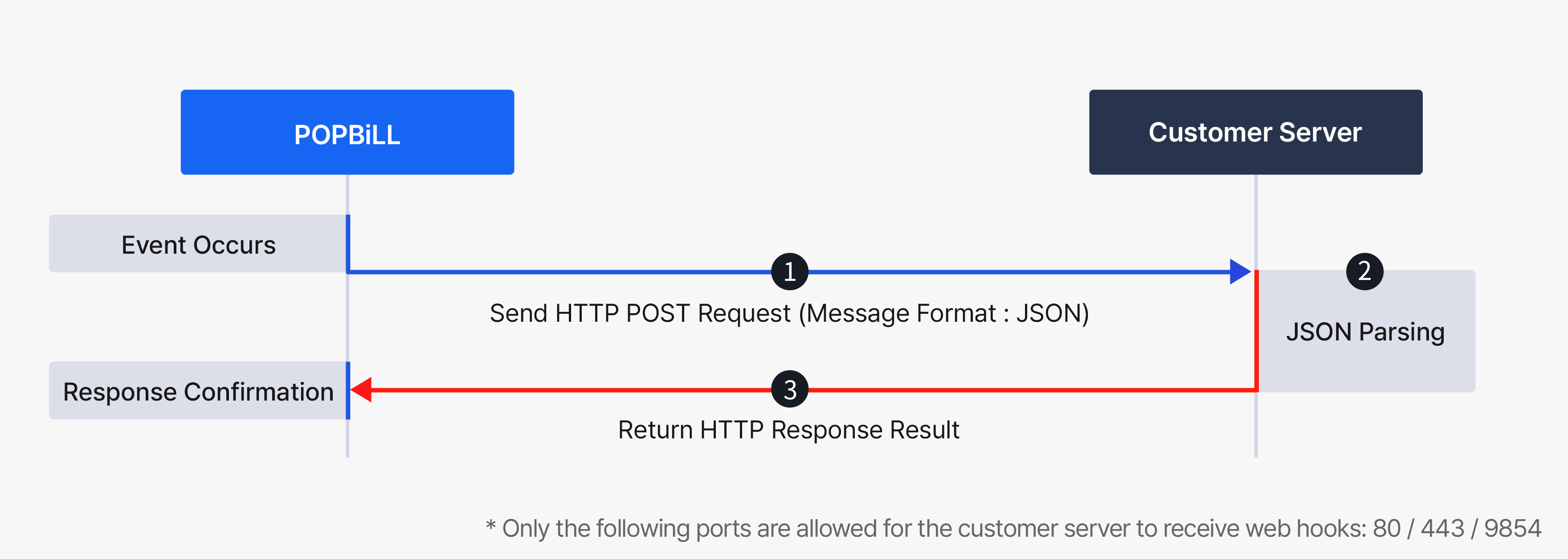
POPBiLL sends the occurred event in real time as an HTTP POST request to the callback URL that the customer has pre-registered with POPBiLL. The customer can process the received event information in JSON message format and immediately update their system.
-
1. Event Occurrence
When an event occurs, POPBiLL sends the event information as an HTTP POST request message to the callback URL registered by the customer.
-
2. JSON Parsing
The JSON objects in the POST request body are parsed, and the customer’s system database is updated with the information about the event target.
-
3. Response Verification
The customer returns the webhook processing result as an HTTP response to POPBiLL. POPBiLL determines success or failure based on the result returned by the customer’s server.
- Success - The request body includes a success status result. [Response Result]
- Failure - Any result other than a success response is considered a failure. Failed webhooks are retransmitted according to POPBiLL’s [Retransmission Policy]
Webhook Setting
To receive webhooks on the customer’s server, the customer’s firewall must be configured in advance to allow the POPBiLL webhook server’s source IP and port.
| Source IP | Destination | Port |
|---|---|---|
| 54.180.62.221 13.124.72.158 |
Program provider reception IP/Domain | 80, 443, 9854 |
Callback URL Registration
To receive event information generated by POPBiLL in real time on the customer’s server, the callback URL must be registered with POPBiLL in advance. The registration method differs depending on the [Callback URL Type]. POPBiLL provides two options: an “Individual URL” type, which the customer must register directly on the POPBiLL site, and a “Integrated URL” type, which is registered upon the customer’s request via email to POPBiLL.
- If the [User Type] is “Single,” it is recommended that the customer use the Individual URL type, which can be managed directly.
- A separate callback URL registration is required for each API product that needs to use webhooks.
- If you wish to change the URL type, please first request the cancellation of the existing URL information registered with POPBiLL.
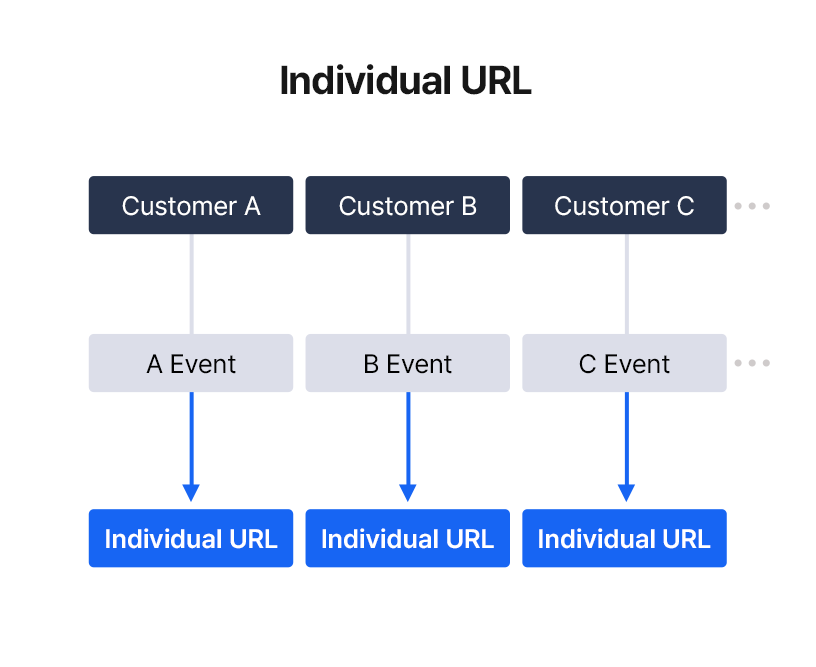
Used when you configure a different callback URL for each business registration number to process webhook event messages.
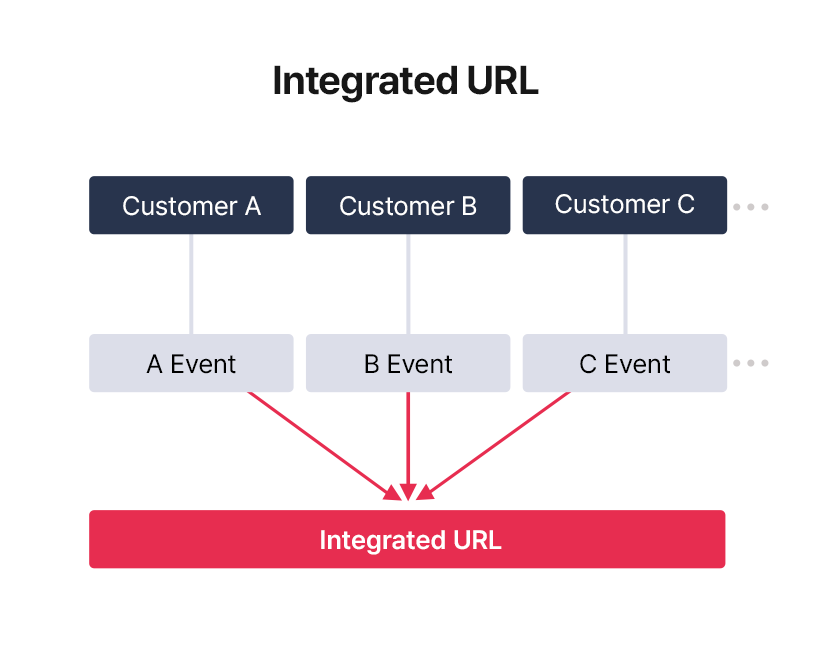
Used when you configure a single callback URL to handle webhook event messages for multiple member companies based on their business registration numbers.
1. Individual URL Registration
The customer directly registers the callback URL on the POPBiLL site to receive events generated for a single member (based on business registration number).
Configuration PathPOPBiLL Test Site(test.popbill.com) Login > Select API Product > Settings > Webhook > Webhook Cfg.
Since POPBiLL’s test and production environments are completely independent, their configurations are not compatible.
After switching to production, the customer must register the callback URL again on the POPBiLL production site (www.popbill.com).
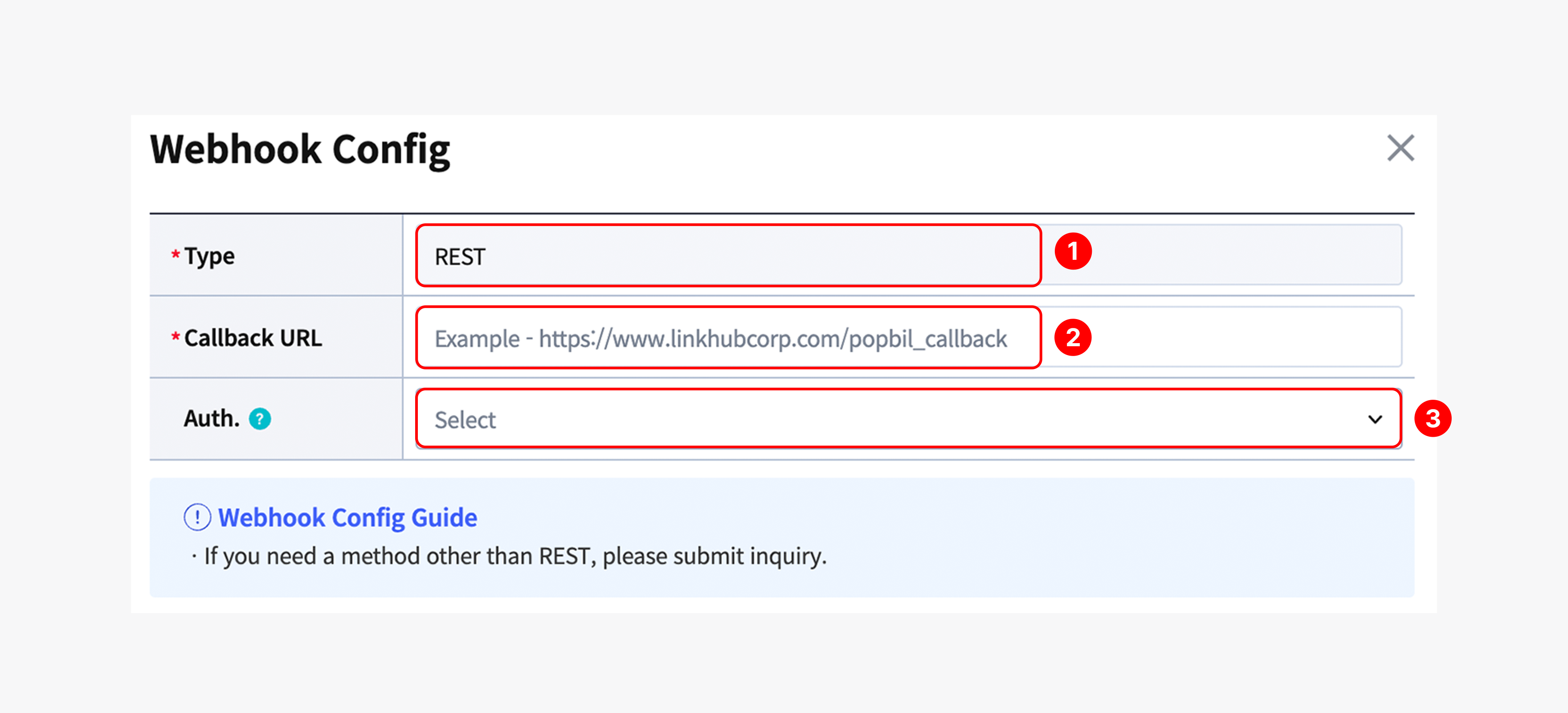
① Webhook Type
POPBiLL primarily supports REST as the default webhook method for transmitting event information to the customer’s server callback URL.
For other methods (e.g., network separation environments or SAP), please contact the POPBiLL Technical Support Center (1600-9854).
② Callback URL
Enter the customer’s server URL information to receive event information in real time.
Example> https://www.linkhub.co.kr/popbill.callback
③ Webhook Authentication (Optional)
This is an HTTP authentication option to apply enhanced security settings to the customer’s webhook receiving server. Depending on the customer’s operational method, this can be optionally applied. By default, webhook authentication is not enabled. POPBiLL supports Basic and API Key authentication methods.
| Authentication Type | Input Information | Encoding | Request Header |
|---|---|---|---|
| Not Used (Default) | - | X | - |
| Basic | User ID and Password | Base64 | Sent in the “Authorization” request header |
| API Key | API Key | X | Sent in the “X-Api-Key” request header |
For inquiries about authentication methods other than Basic or API Key, please contact the POPBiLL Technical Support Center (1600-9854).
2. Integrated URL Registration
This is a callback URL used to receive events generated from multiple customers (based on business registration numbers) on a single server. POPBiLL registers it upon receiving the customer’s request via email, and the registration result is sent back to the customer by email.
- 1. Application Email : partner@linkhubcorp.com / Inquiry: Partner Center 1600-8536
- 2. Subject : [Company Name] Request for Integrated URL Application
-
3. Email Content
-
Applicant Information
- Business Registration Number
- POPBiLL ID
- Contact Person’s Name / Phone Number
-
Application Details
- Effective Date
- Applicable Service
- Webhook Environment : Select either Test or Production
- Webhook Type : REST
- Callback URL
- Webhook Authentication (Optional) : Select either Basic or API Key ※Default: Not in use
-
Applicant Information
For inquiries about authentication methods other than Basic or API Key, please contact the POPBiLL Technical Support Center (1600-9854).
Response Result
The customer returns the processing result of the received webhook to POPBiLL via HTTP response. POPBiLL determines success based on the result returned by the customer. Any response other than success is considered a failure by POPBiLL and will trigger a retry.
1. Success
If the customer successfully receives the webhook, the response body must be returned in either String or JSON format as shown below.
| Type | Status Code | Success Result |
|---|---|---|
| Response Body | 200 | - String type: “OK” - JSON type: {“result”:“OK”} |
2. Failure and Retransmission
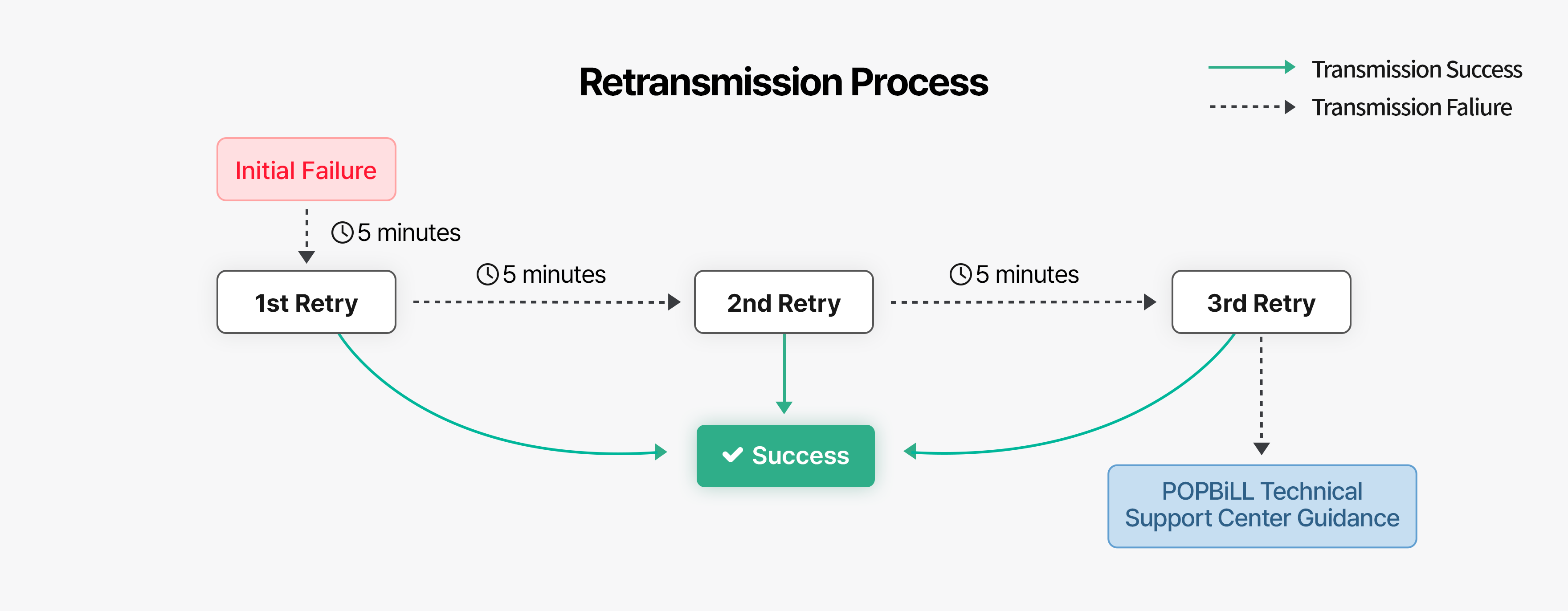
If the webhook is not delivered to the customer’s server, POPBiLL will automatically retransmit it up to 4 times according to the [Retransmission Policy]
If the final attempt also fails, POPBiLL’s technical support center will notify the customer through a pre-arranged channel (phone or email).
- No response result returned : The customer’s server does not return a response result after receiving the webhook.
- Response body format mismatch : The format of the response result does not match the format required by POPBiLL.
- HTTP communication error : HTTP communication fails due to reasons such as network issues, server downtime, or connection errors.
- Other : Failures not included in the above reasons.
※ Once the customer’s system is restored, failed webhooks can be re-executed and resent through the POPBiLL site.
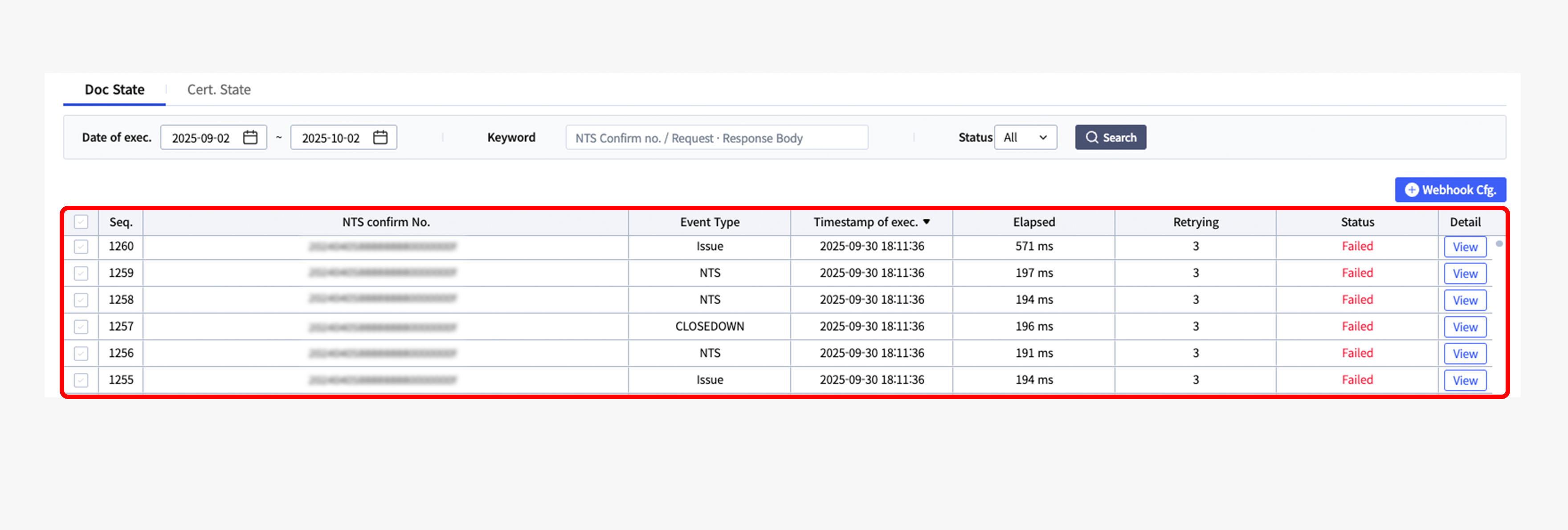
Execution History Check
The customer returns the processing result of the received webhook to POPBiLL via HTTP response. POPBiLL determines success based on the result returned by the customer. Any response other than success is considered a failure by POPBiLL and will trigger a retry.
Configuration PathPOPBiLL Test Site(test.popbill.com) Login > Select API Product > Settings > Webhook
Since POPBiLL’s test and production environments are completely independent, their configurations are not compatible.
After switching to production, webhook execution history can be checked on the POPBiLL production site(www.popbill.com)
Retransmission Policy
To address transmission failures caused by webhook omissions or delays, POPBiLL retransmits failed webhooks up to four times at 5-minute intervals from the initial attempt. If the webhook still fails after the final retransmission, POPBiLL’s technical support center will notify the customer through a pre-arranged channel (phone or email). Once communication with the customer’s server is restored, only the failed webhooks can be selectively retransmitted.
POPBiLL has established a webhook transmission monitoring system, with dedicated staff managing it 24/7 to ensure stable service regardless of weekends or public holidays.