

SDK Preference
This provides guidance on configuration options and the communication for using the SDK.
Configuration Options
The POPBiLL SDK offers the following options to support various environments, allowing you to configure them to match your service environment and use the API reliably.
<util:properties id="EXAMPLE_CONFIG">
    <!-- LinkID -->
    <beans:prop key="LinkID">TESTER</beans:prop>
    <!-- SecretKey -->
    <beans:prop key="SecretKey">SwWxqU+0TErBXy/9TVjIPEnI0VTUMMSQZtJf3Ed8q3I=</beans:prop>
    <!-- Config value for stage setting true(TEST), false(PRODUCTION) -->
    <beans:prop key="IsTest">true</beans:prop>
    <!-- Whether to use the authorization token IP restriction function -->
    <!-- or not Recommended to use(true) -->
    <beans:prop key="IsIPRestrictOnOff">true</beans:prop>
    <!-- Whether to use POPBiLL API service static IP or not, -->
    <!-- true – use, false – do not use, Default(false) -->
    <beans:prop key="UseStaticIP">false</beans:prop>
    <!-- Whether to use the time of the local system or not -->
    <!-- true - use(default – recommended), false – do not use -->
    <beans:prop key="UseLocalTimeYN">true</beans:prop>
</util:properties>
<beans:beans>
    <!-- NTS Crawling Service Implementation Bean registration. -->
    <beans:bean id="htCashbillService" class="com.popbill.api.hometax.HTCashbillServiceImp">
        <beans:property name="linkID" value="#{EXAMPLE_CONFIG.LinkID}"/>
        <beans:property name="secretKey" value="#{EXAMPLE_CONFIG.SecretKey}"/>
        <beans:property name="test" value="#{EXAMPLE_CONFIG.IsTest}"/>
        <beans:property name="IPRestrictOnOff" value="#{EXAMPLE_CONFIG.IsIPRestrictOnOff}"/>
        <beans:property name="useStaticIP" value="#{EXAMPLE_CONFIG.UseStaticIP}"/>
        <beans:property name="useLocalTimeYN" value="#{EXAMPLE_CONFIG.UseLocalTimeYN}"/>
    </beans:bean>
</beans:beans>
IsTest : TEST ↔ PRODUCTION Stage Setting
POPBiLL provides the independently operated TEST and PRODUCTION stages, and it can be switched by the value of a IsTest variable. The identical API key is used on both stages. By modifying the value of IsTest variable, you can switch the stage setting between TEST and PRODUCTION.
| Type | True (=default) | False |
|---|---|---|
| IsTest | TEST | PRODUCTION |
| URL | https://test.popbill.com | https://www.popbill.com |
| API Key | Identical (both LinkID and SecretKey) | |
After you complete the go-live request process, switch the stage setting to PRODUCTION. If you need to switch back to the TEST stage, modify the value of IsTest variable.
IsIPRestrictOnOff : Setting the Authentication Token IP
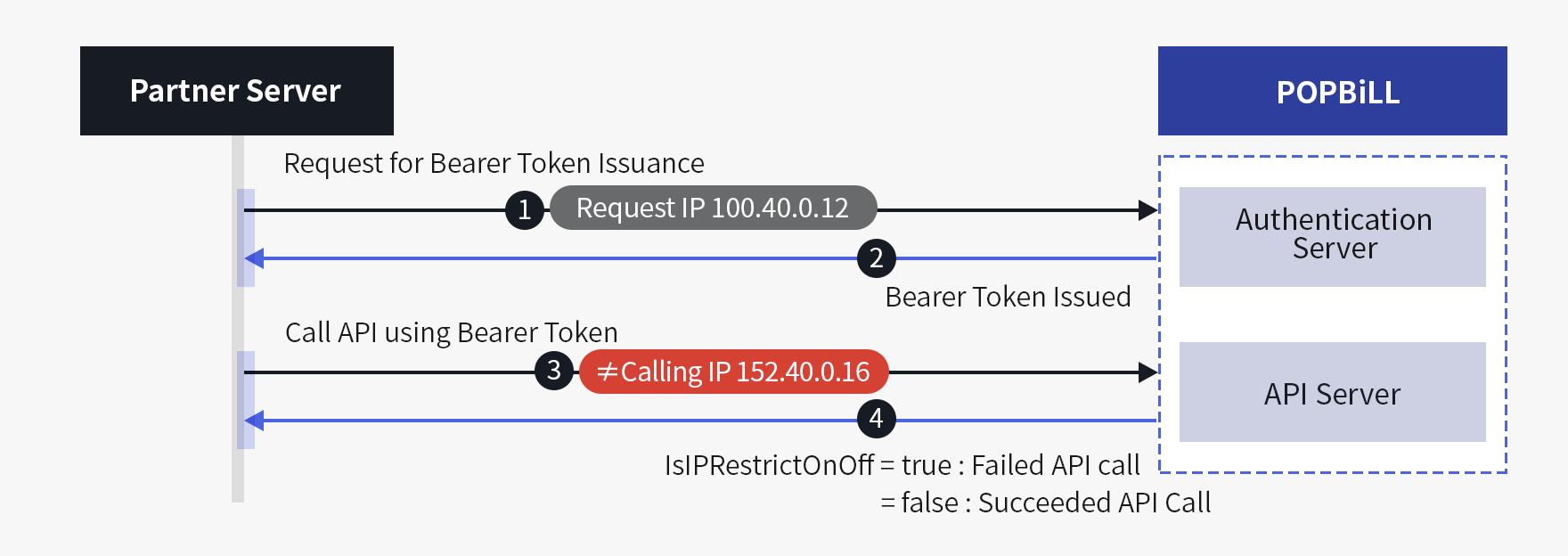
To use the POPBiLL API, you must request the issuance for Bearer Token from POPBiLL authentication server. You can call the API only with the issued Token. To prevent the misuse and accidents caused by snooping/sniffing, POPBiLL proceeds the verification process of whether the IP that requested the Bearer Token matches with the IP that called the API. By using the IsIPRestrictOnOff variable, you can choose whether to use this option or not.
| Type | True(=default) | False |
|---|---|---|
| IsIPRestrictOnOff | Verifies whether the authentication request IP matches with the API calling IP | Excludes the verification process of the IP addresses |
UseStaticIP : Communication Static IP (Support Firewall)
If a partner uses POPBiLL API with static IP due to the internal system security or firewall policy, UseStaticIP variable can set whether to use static IP or not. POPBiLL supports the safe data communication by providing IP whitelist that allows the limited access on pre-registered IP communication.
| Type | True | False (=default) |
|---|---|---|
| UseStaticIP | Use Elastic IP | Use Dynamic IP |
-
Default Domain(Elastic IP) : not allowed to register firewall policy or security device
- 1) Authentications server : https://auth.linkhub.co.kr
- 2) PRODUCTION : https://popbill.linkhub.co.kr
- 3) TEST : https://popbill-test.linkhub.co.kr
-
Static Domain(Static IP) : 52.78.164.186 / 13.124.222.90
- 1) Authentications server : https://static-auth.linkhub.co.kr
- 2) PRODUCTION : https://static-popbill.linkhub.co.kr
- 3) TEST : https://static-popbill-test.linkhub.co.kr
API Communication
Every POPBiLL API is provided as REST API, and it is not dependent on the type of OS and DB if the development environment is available to request HTTP. You can only call HTTPS protocol that is applied with SSL(Secure Sockets Layer), and it provides response result for API request in JSON format. If an error occurs while processing POPBiLL API request, a response consisted of an error code, content message along with HTTP Status code will be returned.
Communication Policy
- HTTPS RESTful API
- Support TLS 1.3, 1.2
- Message format based on JSON(JavasScript Object Notation)
IP & URL (Firewall)
Firewall settings can be applied by choosing either an Elastic IP (dynamic) or a Static IP (fixed).
which IP is used depends on the SDK's UseStaticIP : Communication Static IP (Support Firewall) configuration.
Elastic IP (Default)
This is a Domain using ALB service of AWS Cloud to return Dynamic IP. When setting UseStatic IP of POPBiLL SDK as false(Default), the Elastic IP will be applied.
| Configuration | URL | Port |
|---|---|---|
| POPBiLL Authentication Server | https://auth.linkhub.co.kr | 443 |
| POPBiLL API Production Server | https://popbill.linkhub.co.kr | |
| POPBiLL API Test Server | https://popbill-test.linkhub.co.kr |
Static IP
① If you need to set static IP of Outbound Traffic due to security policy or firewall, you need to register the below Outbound information.
| Configuration | URL | IP | Port |
|---|---|---|---|
| POPBiLL Authentication Server | https://static-auth.linkhub.co.kr | 52.78.164.186 13.124.222.90 |
443 |
| POPBiLL API Production Server | https://static-popbill.linkhub.co.kr | ||
| POPBiLL API Test Server | https://static-popbill-test.linkhub.co.kr |
② If you set the UseStaticIP of POPBiLL SDK as True, the Static IP will be applied. [SDK Preference]