
Introduction
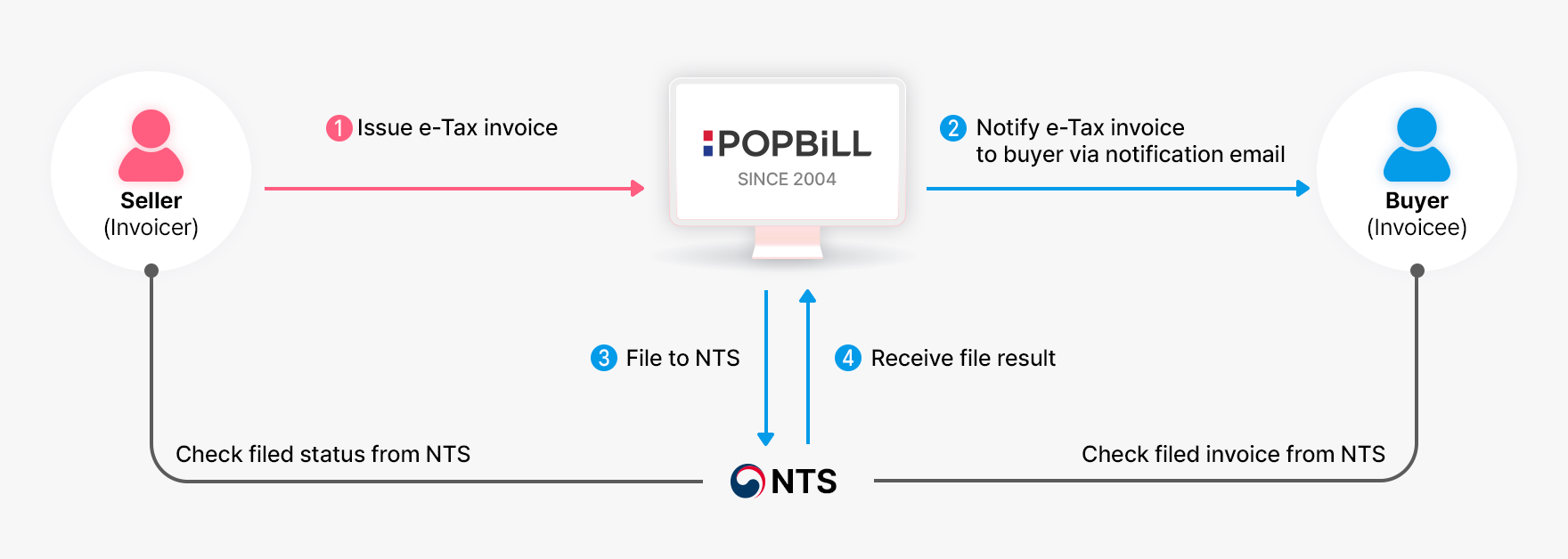
A seller enters the required values of e-Tax invoice and issues by making digital signature with the certificate information. Once issued, the e-Tax invoice will be automatically filed to NTS server in accordance with a user’s setting. [NTS filing option]
Prior to issuing an e-Tax invoice, a user must register the proper joint certificate(issued with business registration number) information in POPBiLL server. [Joint Certificate]
Notification Mail
POPBiLL system automatically sends a notification mail to the entered email address on buyer’s information. It is used to notify the status change events including the following common instances.
| Document Status | Description | Recipient |
|---|---|---|
| Issued | A seller issued the e-Tax invoice | Buyer |
| Cancelled the Issuance | A seller cancelled the issued e-Tax invoice | Buyer |
| ※ Exception applies for the failed NTS filing result, which a notification mail goes to both seller and buyer. | ||
Example of e-Tax Invoice
-
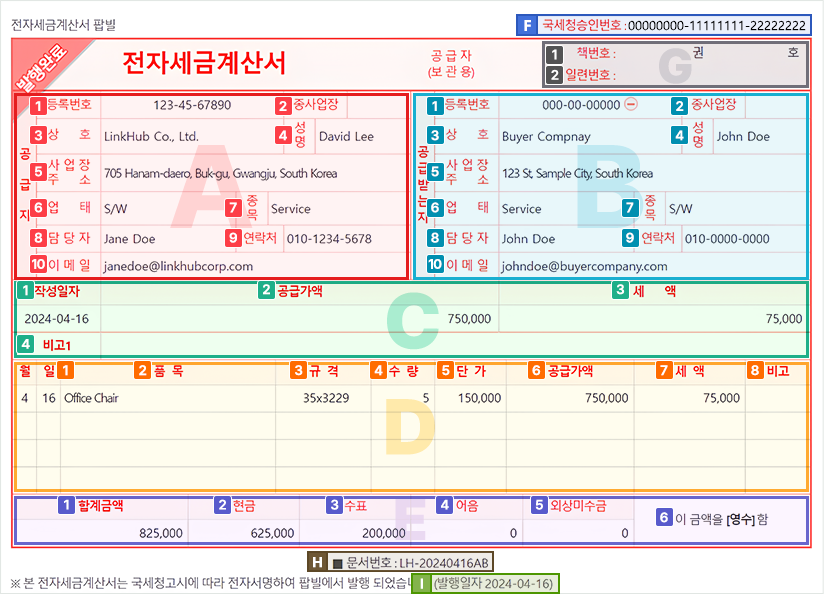
* (asterisk) value indicates mandatory field
Group A Seller Information
Group B Buyer Information- 1) Business registration number (등록번호)
- 2) Identification number of a branch place (종사업장)
- 3) Company name (상호)
- 4) CEO name (성명)
- 5) Company address (사업장 주소)
- 6) Type of business (업태)
- 7) Items of business (종목)
- 8) Name of the person in charge (담당자)
- 9) Contact number of the person in charge (연락처)
- 10) Email of the person in charge (이메일)
Group C Transaction Information
- 1) Date of preparation (작성일자)
- 2) Total amount of supply value (공급가액)
- 3) Total amount of tax (세액)
- 4) Remark1 (비고1)
Group D Item Information
- 1) Date of trade (M/D) (월/일)
- 2) Item name (품목)
- 3) Specification (규격)
- 4) Quantity (수량)
- 5) Unit price (단가)
- 6) Supply value (공급가액)
- 7) Tax amount (세액)
- 8) Remark (비고)
Group E Payment Information
- 1) Total due amount (합계금액)
- 2) Cash (현금)
- 3) Check (수표)
- 4) Credit (어음)
- 5) Note (외상미수금)
-
6) Payment received or not
- - 영수 : payment received
- - 청구 : payment not received
- - 없음 : none
Group F NTS confirmation number (국세청승인번호)
POPBiLL automatically assigns this value when issuing an e-Tax invoice
Group G Book number
- 1) Volume of a book (권)/ Number of a book (호)
- 2) Serial number (일련번호)
Group H Document ID (문서번호)
Group I Date of issunace (발행일자)
POPBiLL automatically assigns this value when issuing an e-Tax invoice
-
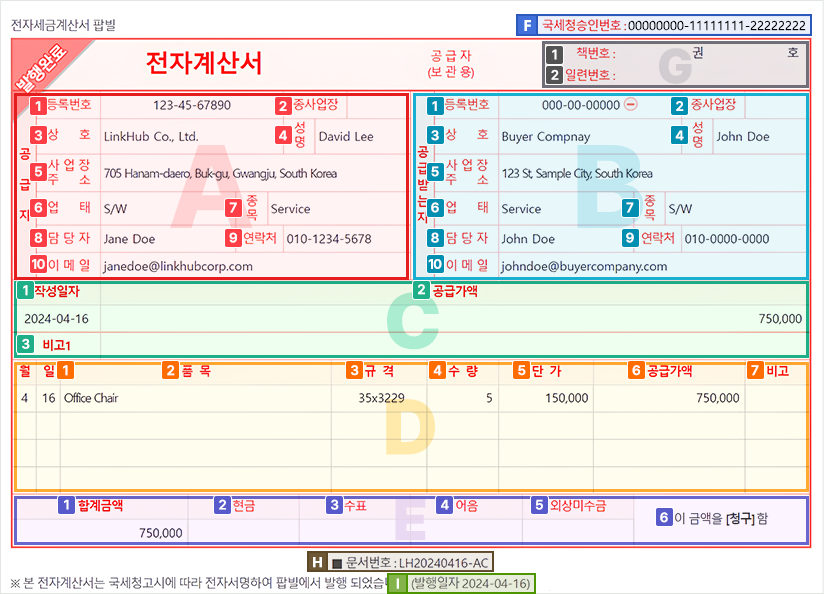
* (asterisk) value indicates mandatory field
Group A Seller Information
Group B Buyer Information- 1) Business registration number (등록번호)
- 2) Identification number of a branch place (종사업장)
- 3) Company name (상호)
- 4) CEO name (성명)
- 5) Company address (사업장 주소)
- 6) Type of business (업태)
- 7) Items of business (종목)
- 8) Name of the person in charge (담당자)
- 9) Contact number of the person in charge (연락처)
- 10) Email of the person in charge (이메일)
Group C Transaction Information
- 1) Date of preparation (작성일자)
- 2) Total amount of supply value (공급가액)
- 3) Remark1 (비고1)
Group D Item Information
- 1) Date of trade (M/D) (월/일)
- 2) Item name (품목)
- 3) Specification (규격)
- 4) Quantity (수량)
- 5) Unit price (단가)
- 6) Supply value (공급가액)
- 7) Remark (비고)
Group E Payment Information
- 1) Total due amount (합계금액)
- 2) Cash (현금)
- 3) Check (수표)
- 4) Credit (어음)
- 5) Note (외상미수금)
-
6) Payment received or not
- - 영수 : payment received
- - 청구 : payment not received
- - 없음 : none
Group F NTS confirmation number (국세청승인번호)
POPBiLL automatically assigns this value when issuing an e-Tax invoice
Group G Book number
- 1) Volume of a book (권)/ Number of a book (호)
- 2) Serial number (일련번호)
Group H Document ID (문서번호)
Group I Date of issunace (발행일자)
POPBiLL automatically assigns this value when issuing an e-Tax invoice