튜토리얼 - ASP.NET
.NET 개발환경에서 팝빌 SDK를 추가하고, 현금영수증 즉시 발행 (RegistIssue) API를 호출하는 기본 과정을 단계별로 따라 해볼 수 있도록 구성된 가이드 입니다.
POPBiLL SDK 추가
섹션 제목: “POPBiLL SDK 추가”① 팝빌 연동자료실에서 ASP.NET SDK 예제코드 다운로드 후 압축을 해제합니다.
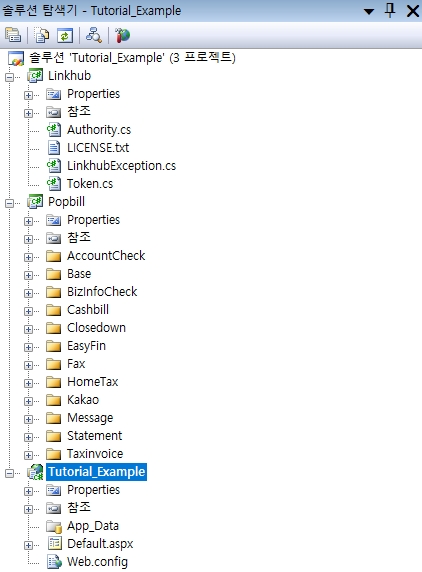
② 다운받은 SDK 예제코드의 Linkhub/, Popbill/ 폴더를 SDK를 적용할 프로젝트 경로에 복사하고, Linkhub.csproj, Popbill.csproj를 각각 기존 프로젝트로 추가합니다.
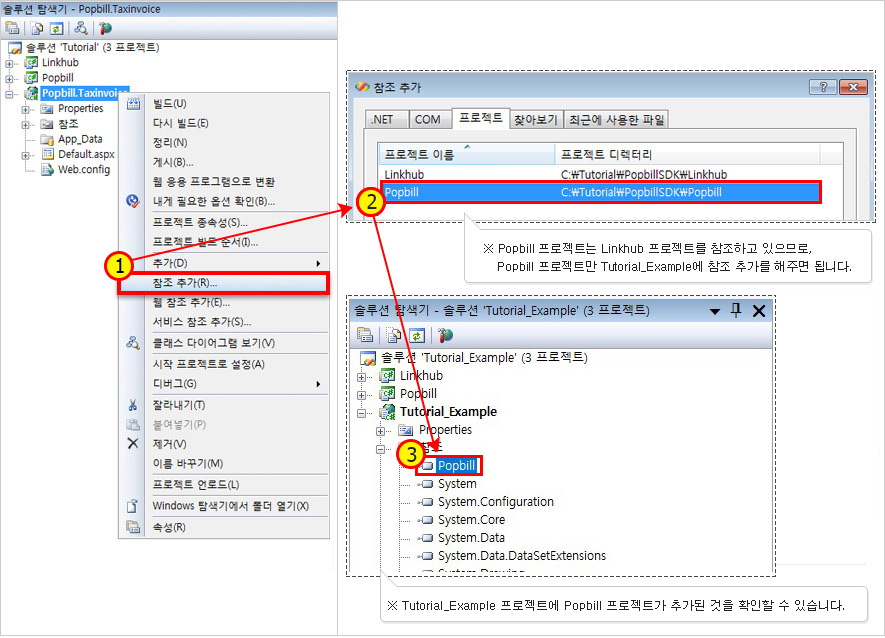
③ Popbill 프로젝트를 적용할 프로젝트의 참조로 추가합니다.
RegistIssue 기능 구현
섹션 제목: “RegistIssue 기능 구현”Web Form을 추가하여 registIssue.aspx를 생성하여 응답코드, 메시지 확인 페이지를 추가하고, registIssue.aspx.cs 파일의 Page_Load 이벤트에 함수 호출 코드를 추가합니다.
registIssue.aspx
<%@ Page Language="C#" AutoEventWireup="true" CodeBehind="registIssue.aspx.cs" Inherits="Popbill.Cashbill.Example.registIssue" %>
<!DOCTYPE html PUBLIC "-//W3C//DTD XHTML 1.0 Transitional//EN" "http://www.w3.org/TR/xhtml1/DTD/xhtml1-transitional.dtd">
<html xmlns="http://www.w3.org/1999/xhtml"><head id="Head1" runat="server">  <title>Popbill Cashbill</title></head><body><div>  <p>Response</p>  <br/>  <fieldset>    <legend>현금영수증 즉시 발행</legend>    <ul>      <li>Response.code : <%= code %></li>      <li>Response.message : <%= message %></li>    </ul>  </fieldset></div></body></html>
registIssue.aspx.cs
using System;using System.Collections;using System.Configuration;using System.Data;using System.Linq;using System.Web;using System.Web.Security;using System.Web.UI;using System.Web.UI.HtmlControls;using System.Web.UI.WebControls;using System.Web.UI.WebControls.WebParts;using System.Xml.Linq;
namespace Popbill.Cashbill.Example{    public partial class registIssue : System.Web.UI.Page    {        public String code;        public String message;
        protected void Page_Load(object sender, EventArgs e)        {
            // 팝빌회원 사업자번호, '-' 제외 10자리            String testCorpNum = "1234567890";
            // 팝빌회원 아이디            String testUserID = "testkorea";
            // 현금영수증 문서번호            String mgtKey = "20250314-001";
            // 메모            String memo = "즉시 발행 메모";

            // 현금영수증 객체 생성            Cashbill cashbill = new Cashbill();
            // 문서번호            // 문서 관리를 위해 파트너가 할당하는 식별번호            // 1~24자리 영문 대소문자, 숫자, 특수문자('-','_')로 구성            cashbill.mgtKey = mgtKey;
            // 거래일시, 형식(yyyyMMddHHmmss)            // 발행기준 전일부터 당일까지 입력 가능            // 미입력시 기본값(발행일시) 처리됨            cashbill.tradeDT = "20250319093919";
            // 문서형태            cashbill.tradeType = "승인거래";
            // 거래구분, [소득공제용, 지출증빙용] 중 기재            cashbill.tradeUsage = "소득공제용";
            // 거래유형, [일반, 도서공연, 대중교통] 중 기재            cashbill.tradeOpt = "일반";
            // 과세형태, [과세, 비과세] 중 기재            cashbill.taxationType = "과세";
            // 합계금액, 공급가액 + 부가세 + 봉사료            cashbill.totalAmount = "11000";
            // 공급가액            cashbill.supplyCost = "10000";
            // 부가세            cashbill.tax = "1000";
            // 봉사료            cashbill.serviceFee = "0";
            // 가맹점 사업자번호, "-" 제외 10자리            cashbill.franchiseCorpNum = testCorpNum;
            // 가맹점 종사업장 식별번호            cashbill.franchiseTaxRegID = "";
            // 가맹점 상호            cashbill.franchiseCorpName = "발행자 상호";
            // 가맹점 대표자 성명            cashbill.franchiseCEOName = "발행자 대표자";
            // 가맹점 주소            cashbill.franchiseAddr = "발행자 주소";
            // 가맹점 전화번호            cashbill.franchiseTEL = "070-1234-1234";
            // 식별번호, 거래구분에 따라 작성            // 소득공제용 - 주민등록/휴대폰/카드번호/자진발급용 번호(010-000-1234) 기재가능            // 지출증빙용 - 사업자번호/주민등록/휴대폰/카드번호 기재가능            cashbill.identityNum = "0101112222";
            // 주문 상품명            cashbill.itemName = "상품명";
            // 주문번호            cashbill.orderNumber = "주문번호";
            // 구매자(고객) 성명            cashbill.customerName = "고객명";
            // 구매자(고객) 이메일            // 팝빌 개발환경에서 테스트하는 경우에도 안내 메일이 전송되므로,            // 실제 구매자의 메일주소가 기재되지 않도록 주의            cashbill.email = "test@test.com";
            // 구매자(고객) 휴대폰            cashbill.hp = "010-111-222";
            // 구매자 알림문자 전송 여부            // 알림문자 전송시 포인트가 차감되며, 전송실패시 환불처리됨            cashbill.smssendYN = false;
            try            {                Response response = Global.cashbillService.RegistIssue(testCorpNum, cashbill, memo, testUserID);
                code = response.code.ToString();                message = response.message;            }            catch (PopbillException ex)            {                code = ex.code.ToString();                message = ex.Message;            }        }    }}
API 응답결과 확인
섹션 제목: “API 응답결과 확인”API 호출 응답결과는 다음과 같습니다.
| 구분 | 응답 |
|---|---|
| 성공 | code : 1 |
| 실패 | code : 오류코드 (8자리 음의 정수) [오류코드] message : 오류메시지 |