웹훅 튜토리얼
튜토리얼
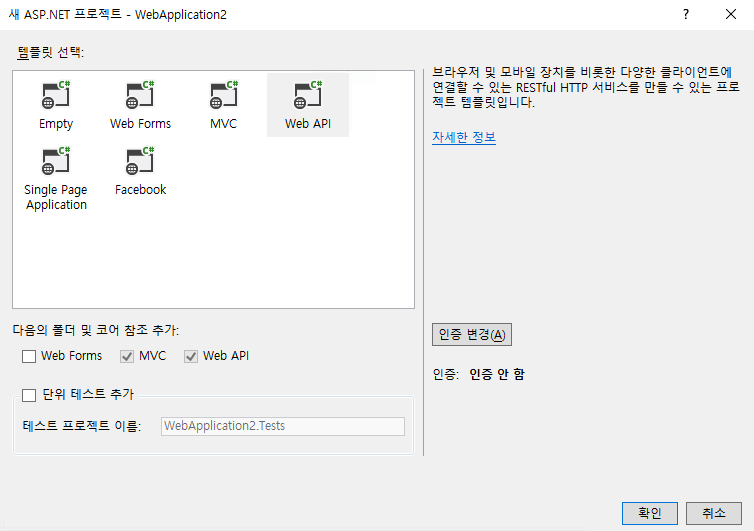
섹션 제목: “튜토리얼”① Webhook 수신 기능을 구현하기 위한 Web API 프로젝트를 생성합니다.
② JSON 포맷의 Webhook 메시지를 매핑하기 위한 프로젝트 Models/ 폴더에 모델 클래스 파일을 추가합니다. ※추가적인 Webhook 필드 항목은 [Webhook 메시지 구성]을 참조하여 추가합니다.
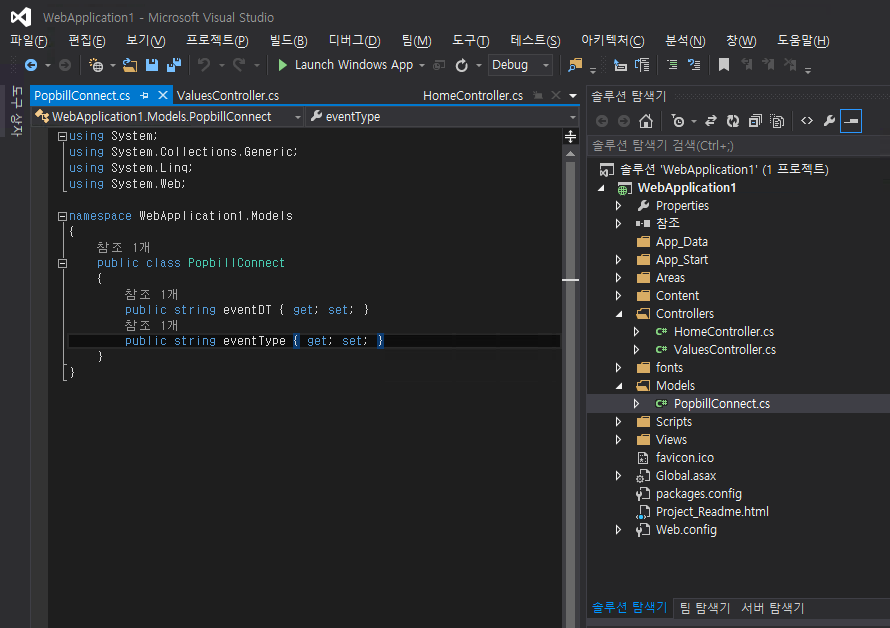
using System;using System;using System.Collections.Generic;using System.Linq;using System.Web;
namespace WebApplication1.Models{    public class PopbillConnect    {        public string eventDT { get; set; }        public string eventType { get; set; }        // 하단의 [Webhook 메시지 구성]을 참조하여 모델 필드 추가    }}
③ POST 메시지를 처리하는 C# APIController 코드를 추가합니다.
using System;using System.Collections.Generic;using System.Linq;using System.Net;using System.Net.Http;using System.Web.Http;using WebApplication1.Models;
namespace WebApplication1.Controllers{    public class ValuesController : ApiController    {
        // POST api/values        public HttpResponseMessage Post([FromBody]PopbillConnect jsonInfo)        {            var response = new HttpResponseMessage();            response.Headers.Add("ContentType", "text/plain");
            // PopbillConnect 모델에 선언된 필드 매핑            String eventDT = jsonInfo.eventDT;            String eventType = jsonInfo.eventType;
            Console.WriteLine(eventType);
            // Webhook 성공 응답 처리            response.StatusCode = HttpStatusCode.OK;            response.Content = new StringContent("OK");
            return response;        }    }}