튜토리얼 - ASP.NET
.NET 개발환경에서 팝빌 SDK를 추가하고, 카카오톡 알림톡 전송 (SendATS) API를 호출하는 기본 과정을 단계별로 따라 해볼 수 있도록 구성된 가이드 입니다.
POPBiLL SDK 추가
섹션 제목: “POPBiLL SDK 추가”① 팝빌 연동자료실에서 ASP.NET SDK 예제코드 다운로드 후 압축을 해제합니다.
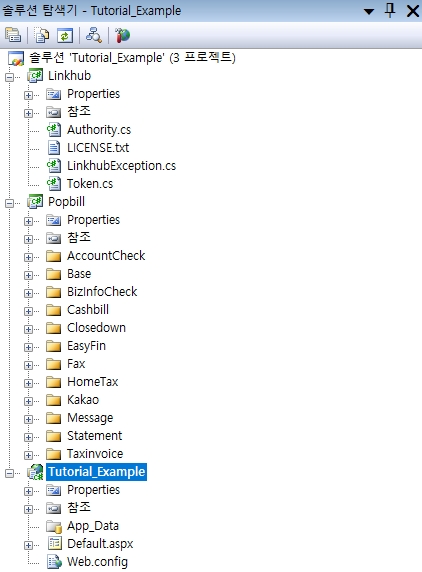
② 다운받은 SDK 예제코드의 Linkhub/, Popbill/ 폴더를 SDK를 적용할 프로젝트 경로에 복사하고, Linkhub.csproj, Popbill.csproj를 각각 기존 프로젝트로 추가합니다.
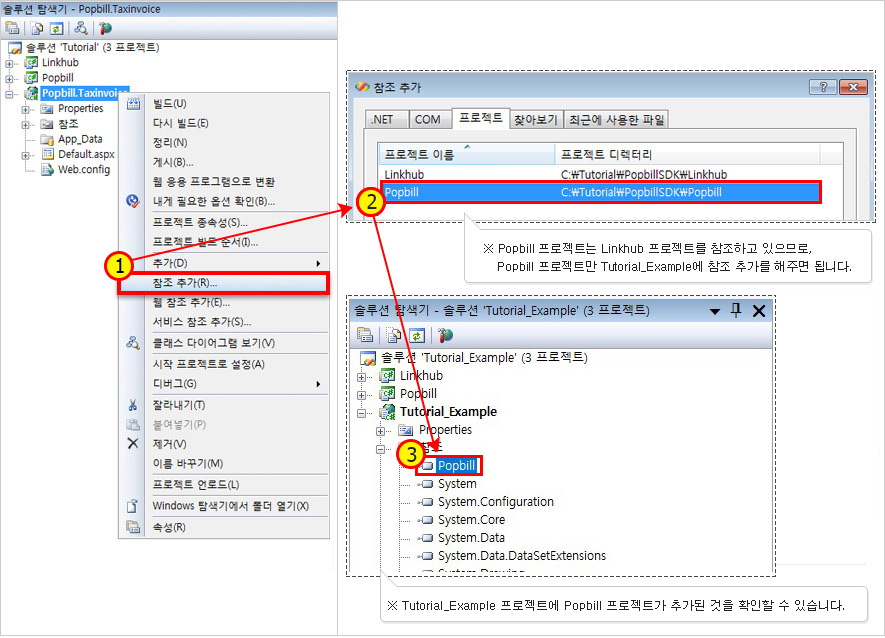
③ Popbill 프로젝트를 적용할 프로젝트의 참조로 추가합니다.
SendATS 기능 구현
섹션 제목: “SendATS 기능 구현”Web Form을 추가하여 sendATS.aspx를 생성하여 응답코드, 메시지 확인 페이지를 추가하고, sendATS.aspx.cs 파일의 Page_Load 이벤트에 함수 호출 코드를 추가합니다.
sendATS.aspx
<%@ Page Language="C#" AutoEventWireup="true" CodeBehind="sendATS.aspx.cs" Inherits="Tutorial_Example.sendATS" %><!DOCTYPE html PUBLIC "-//W3C//DTD XHTML 1.0 Transitional//EN" "http://www.w3.org/TR/xhtml1/DTD/xhtml1-transitional.dtd"><html xmlns="http://www.w3.org/1999/xhtml" ><head runat="server"> <title>Popbill .NET SDK Example</title></head><body><div> <p>Response</p> <fieldset> <legend>알림톡 1건 전송</legend> <ul> <% if (!String.IsNullOrEmpty(code)) { %> <li>Response.code : <%= code %> </li> <li>Response.message : <%= message %></li> <% } else { %> <li>receiptNum(접수번호) : <%= receiptNum %></li> <% } %> </ul> </fieldset></div></body></html>sendATS.aspx.cs
using System;using System.Collections;using System.Collections.Generic;using System.Configuration;using System.Data;using System.Linq;using System.Web;using System.Web.Security;using System.Web.UI;using System.Web.UI.HtmlControls;using System.Web.UI.WebControls;using System.Web.UI.WebControls.WebParts;using System.Xml.Linq;
using Popbill;using Popbill.Kakao;
namespace Tutorial_Example{    public partial class sendATS : System.Web.UI.Page    {        public String code;        public String message;        public String receiptNum;        protected void Page_Load(object sender, EventArgs e)        {            /**             * 알림톡 전송을 요청합니다.             * - 사전에 승인된 템플릿의 내용과 알림톡 전송내용(content)이 다를 경우 전송실패 처리됩니다.             * - /reference/kakaotalk/dotnet/api/send#SendATSOne             */
            // 팝빌회원 사업자번호            String testCorpNum = "1234567890";
            // 팝빌회원 아이디            String testUserID = "testkorea";
            // 승인된 알림톡 템플릿코드            String templateCode = "019020000163";
            // 발신번호            String senderNum = "";
            // 알림톡 내용            String content = "[ 팝빌 ]\n";            content += "신청하신 #{템플릿코드}에 대한 심사가 완료되어 승인 처리되었습니다.\n";            content += "해당 템플릿으로 전송 가능합니다.\n\n";            content += "문의사항 있으시면 파트너센터로 편하게 연락주시기 바랍니다.\n\n";            content += "팝빌 파트너센터 : 1600-8536\n";            content += "support@linkhub.co.kr".Replace("\n", Environment.NewLine);
            // 대체문자 제목            String altSubject = "대체문자 제목";
            // 대체문자 내용            String altContent = "대체문자 메시지 내용";
            // 대체문자 유형            String altSendType = "";
            // 수신번호            String receiverNum = "";
            // 수신자명            String receiverName = "수신자명";
            // 전송 예약일시            String reserveDTStr = "";
            // 요청번호            String requestNum = "";
            DateTime? reserveDT = null;            if (reserveDTStr != null && reserveDTStr != "")            {                reserveDT = DateTime.ParseExact(reserveDTStr, "yyyyMMddHHmmss", System.Globalization.CultureInfo.InvariantCulture);            }
            // 버튼 목록            List<KakaoButton> buttons = null;
            /*            List<KakaoButton> buttons = new List<KakaoButton>();            KakaoButton btnInfo = new KakaoButton();            btnInfo.n = "전화 연결";            btnInfo.t = "TN";            btnInfo.u1 = "";            btnInfo.u2 = "";            btnInfo.tg = "";            btnInfo.telNum = "1600-8536";            buttons.Add(btnInfo);            */
            //강조표기형            String emphasizeTitle = "";
            try            {                receiptNum = Global.kakaoService.SendATS(testCorpNum, templateCode, senderNum, altSendType, reserveDT,                    receiverNum, receiverName, content, altContent, requestNum, buttons, emphasizeTitle);            }            catch (PopbillException ex)            {                code = ex.code.ToString();                message = ex.Message;            }        }    }}
API 응답결과 확인
섹션 제목: “API 응답결과 확인”API 호출 응답결과는 다음과 같습니다.
| 구분 | 응답 |
|---|---|
| 성공 | ReceiptNum(접수번호) : 18자리 문자열 |
| 실패 | code : 오류코드 (8자리 음의 정수) [오류코드] message : 오류메시지 |